How Browser Uses Https
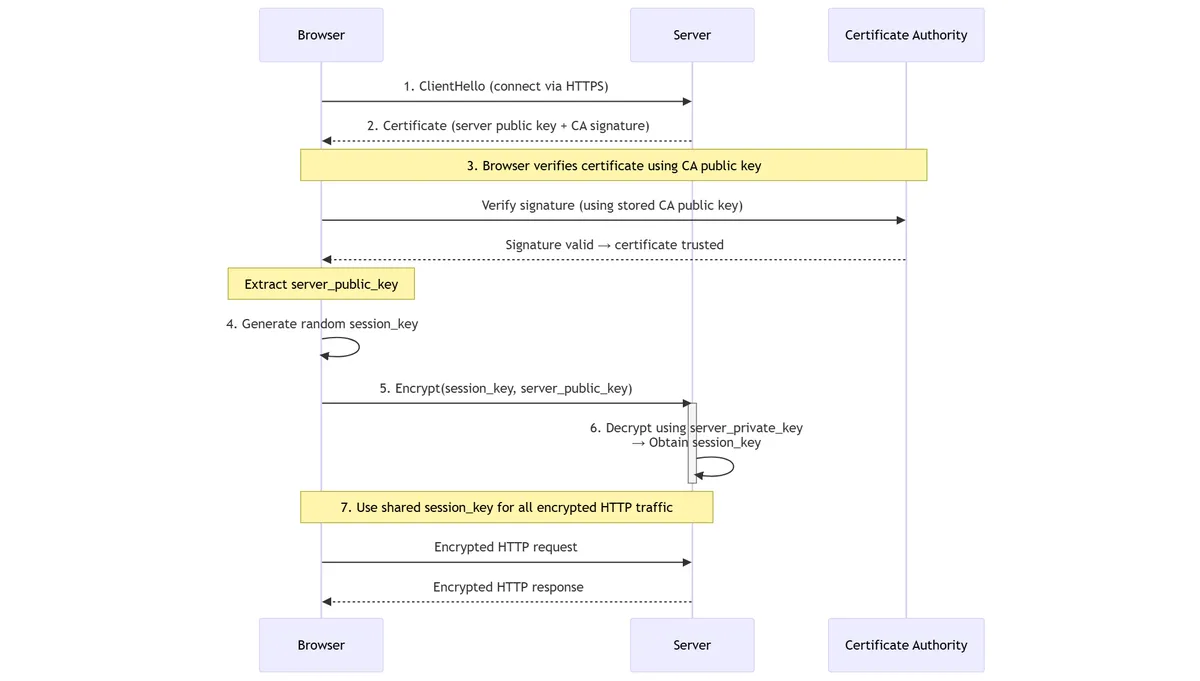
1. Browser → Server: “Send me your identity”
The browser connects to the server and requests its TLS certificate.
2. Server → Browser: Certificate
The server sends a certificate containing:
- The server’s public key
- The domain name
- Metadata, expiration, etc.
- A digital signature generated by the Certificate Authority (CA)
3. Browser verifies the certificate signature (using CA public key)
Two different public keys are involved:
- Server public key → used later to encrypt data for the server
- CA public key → used now to verify the certificate signature
These keys serve completely different roles.
🔐 What is signed in a certificate?
{
  domain: "example.com",
  server_public_key: <the server’s public key>,
  ...
}
The Certificate Authority (CA) takes this data and signs it with the CA private key:
certificate = {
  data: {
    domain,
    server_public_key,
    ...
  },
  signature: SignWithCAPrivateKey(hash(data))
}
🔐 How the browser verifies the signature
Browsers have trusted CA public keys built in.
To verify the certificate:
- Compute
hash(data) - Extract
signature - Check:
VerifyWithCAPublicKey(signature, hash(data)) → valid/invalid
This proves:
- The certificate came from that CA
- The server public key inside is authentic
👍 Key point
You cannot verify the certificate using the server public key. The server public key is only used later, for encryption.
✔️ Ultra-short summary of step 3
- CA signs with CA private key
- Browser verifies with CA public key
- Browser extracts the server public key
- Server public key is then used for encryption
4. Browser generates a random session key
session_key = random()
5. Browser encrypts the session key using the server’s public key
encrypted_key = EncryptWithServerPublicKey(session_key)
Browser → Server: sends encrypted_key.
6. Server decrypts encrypted session key using its private key
session_key = DecryptWithServerPrivateKey(encrypted_key)
Both browser and server now share the same session key.
7. All further communication uses symmetric encryption
EncryptWith(session_key)
DecryptWith(session_key)
Sequence Diagram
sequenceDiagram
    participant Browser
    participant Server
    participant CA as Certificate Authority

    %% Step 1
    Browser->>Server: 1. ClientHello (connect via HTTPS)

    %% Step 2
    Server-->>Browser: 2. Certificate (server public key + CA signature)

    %% Step 3: Certificate verification using CA public key
    note over Browser,CA: 3. Browser verifies certificate using CA public key
    Browser->>CA: Verify signature (using stored CA public key)
    CA-->>Browser: Signature valid → certificate trusted
    note over Browser: Extract server_public_key

    %% Step 4
    Browser->>Browser: 4. Generate random session_key

    %% Step 5
    Browser->>Server: 5. Encrypt(session_key, server_public_key)

    %% Step 6
    activate Server
    Server->>Server: 6. Decrypt using server_private_key<br/>→ Obtain session_key
    deactivate Server

    %% Step 7
    note over Browser,Server: 7. Use shared session_key for all encrypted HTTP traffic
    Browser->>Server: Encrypted HTTP request
    Server-->>Browser: Encrypted HTTP response